
How to Use Google Search Console in Your SEO Strategy
Google Search Console is considered one of the most critical—and often underestimated—SEO tools. In Search Console, you will find important data about your website directly from Google. Below, we’ll show you how to use and analyze each of the SEO reports and tools.
How Important is Google Search Console (GSC)?
Webmasters rely on GSC as one of the most effective ways to check a website’s performance. The great thing about this tool is that it addresses issues that can prevent good rankings. How can it help measure performance?
- Analyzes clicks and the site’s impression positions in Google organic search;
- Allows submission of individual URLs or sitemaps for crawling;
- Checks recent site views through the Index Coverage report;
- Receives alerts about errors and their fixes;
- Obtains and analyzes information about pages according to Google searches.
Once you understand the basic features, you can start using this tool easily. It is the most effective alternative for analyzing website performance. Of course, this platform does not replace other tools, so you can use them complementarily.
- Google Search Console – Key Features
One of the main tools that every website or blog owner should consider when aiming to improve their SEO strategy is Google Search Console. This platform can help answer key questions: Are my website’s data being submitted correctly to Google? Can I fix any errors? Which keywords and pages can I optimize? Here is a list of the most notable features offered by Google Search Console:
Performance Dashboard
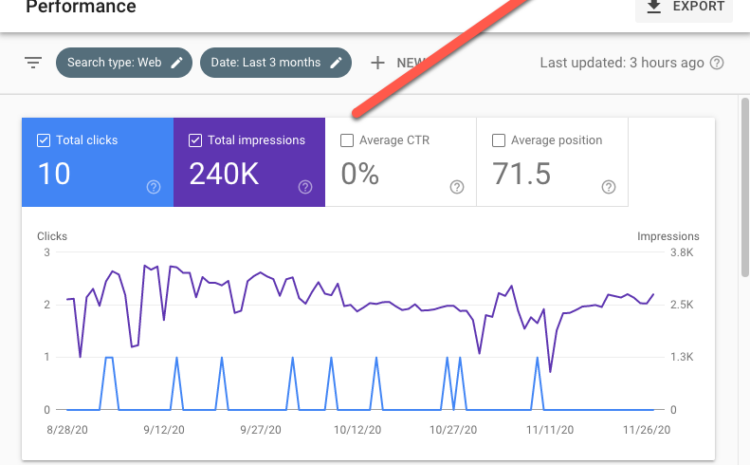
Worried about your website’s search engine performance? GSC acts like a dashboard, showing all the details you need to draw conclusions. What can you get from it? There are multiple indicators providing valuable insights, such as tracking clicks, visibility, mobile usability, and more.
It’s important to know what you are tracking so that you can correctly use the data in future strategies. Additionally, you need knowledge of qualitative data and how to interpret it. Google Search Console is the central system that helps you understand what’s happening. If you own a website, creating a GSC account can be an excellent way to monitor performance.
Control Center
If you want high rankings, the most important factor is your SEO strategy. To achieve effective results based on your objectives, you need specialists who can provide a range of SEO services, whether your strategy is simple or complex. As a website owner, you must ensure your content is updated regularly.
Also, remember that your site must be search engine-friendly. Here again, Google Search Console becomes extremely useful. Any SEO specialist seeks simple ways to minimize errors. GSC is the universal tool that helps detect issues so they can be resolved efficiently.
Some of the tasks you can accomplish with GSC include submitting XML sitemaps and analyzing them. You can also request Google to re-evaluate errors. This helps you understand where and how to intervene. Certain features help you see how your pages appear in Google Search.
Communication Channel
Although GSC is connected to a tracking system, it can also act as a communication channel. How? Google constantly sends various information about your site, such as errors, issues, and sometimes advice on how to fix them. It also provides details about penalties in case of rule violations.
Google Search Console as a Data Source
Google Search Console can be a data source for many people. Information can be exported and imported into other tools, such as Google Analytics. Errors reported by GSC can be analyzed here. This allows you to ensure content is error-free, achieve excellent performance, and improve your site’s indexation in search engines. Considering today’s competition, creating a site correctly is essential if you want your business to hold a strong position in the market.
Submitting Content to Google
Using Google Search Console, you can submit specific URLs to be crawled. This is how you can improve page rankings. GSC also checks your site’s index coverage, helping Google see an up-to-date version of your entire page or website. Additionally, you can see how Google indexing operates through your site’s pages. The URL Inspection tool provides full indexing, crawl access, and page details.
Error Alerts and Fixes
With GSC, you can identify which URLs are experiencing specific issues and how to resolve them. You will receive email alerts whenever Google detects errors. Once fixed, GSC notifies Google about the update. Additionally, you can optimize your site for AMP, mobile, and better search results.
Using a Google Search Console account is extremely convenient. Plus, it’s free and can be set up in just a few steps. If you use some Google services, you likely already have an account. Explore the platform and discover its various features and functions.
Leverage Google Search Console in your marketing strategy to gain significant benefits. Learn now how you can rank your business higher in search engines.
